SpaceCraft
LiDAR 3D Scanner for iPhone
Scan any room, object, or site with your iPhone. Get a 3D model in seconds. Export to any format.
- ±2mm accuracy with LiDAR depth sensing
- Process on-device — no cloud, no waiting
- Export to GLB, OBJ, USDZ, E57
- AR preview built in
- Works offline, anywhere
Three Steps
Scan
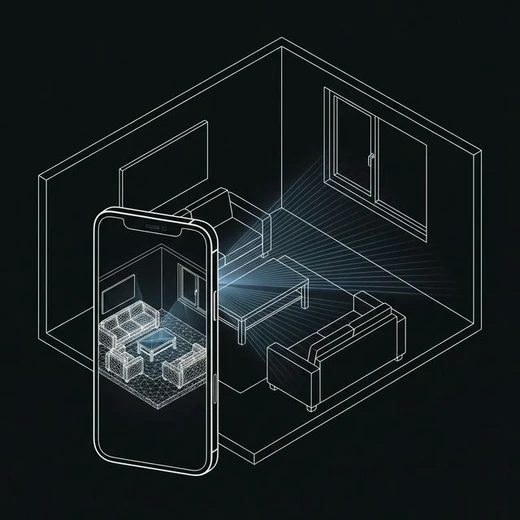
Point your iPhone at a room, object, or building. LiDAR captures depth in real time. Walk around for a full 360° scan — done in minutes.
Process
On-device AI creates a clean, textured 3D mesh. No cloud upload, no waiting. Your scan stays on your phone until you choose to share it.
Use
Export to GLB, OBJ, USDZ, or E57. Open in Rhino, Revit, Blender, or share via AR. Dimensions are baked in.
Who It's For
Existing conditions in minutes
Walk into a site, scan the room, walk out with a 3D model. No tape measure, no manual drawings, no revisits.
- Site survey in 15 minutes
- Accurate wall, ceiling, floor geometry
- Direct export to Rhino or Revit
Design in context
Scan a client's space, then test furniture layouts, material changes, and lighting scenarios in 3D before committing.
- Room-scale scanning
- Furniture placement in AR
- Client walkthrough sharing
Track progress over time
Scan at each milestone. Compare against BIM models. Catch deviations before they become problems.
- Progress documentation
- Scan-to-BIM overlay
- Deviation reports
Sell with 3D tours
Create interactive 3D walkthroughs of properties in minutes. Buyers explore remotely before scheduling a visit.
- One-tap 3D tour creation
- Shareable AR previews
- Accurate floor plans from scan
Who Uses It
Architects
Scan existing conditions on-site. Get a 3D base in minutes instead of hours of manual drawing.
Interior Designers
Scan client rooms, test furniture layouts in 3D, deliver realistic presentations.
Real Estate Agents
Create interactive 3D tours of properties. Buyers explore remotely before visiting.
Construction Teams
Track construction progress against plans. Detect deviations early.
What You Can Scan
Three scales of scanning, one app.
Interior Spaces
Scan a room from corner to corner. Walls, windows, doors, furniture — captured with accurate dimensions. Walk around the space; SpaceCraft stitches it together automatically.
- Living rooms & offices
- Kitchens & bathrooms
- Retail spaces
- Hotel lobbies
Furniture & Details
Circle around an object to capture its full geometry. Works for furniture, fixtures, sculptures, historical artifacts — anything you can walk around.
- Custom furniture
- Architectural details
- Heritage artifacts
- Product prototypes
Buildings & Facades
Scan an entire building exterior or facade. Combine with Apple's satellite view for site context. Export point clouds for large-scale documentation.
- Building facades
- Construction sites
- Landscape features
- Urban documentation
Under the Hood
SpaceCraft combines Apple's depth-sensing hardware with custom reconstruction algorithms. Everything runs on-device.
LiDAR Scanner
Time-of-flight depth sensing at 256×192 resolution, 10m range
ARKit 6
Apple's AR framework for world tracking, plane detection, and mesh generation
RealityKit
High-performance 3D rendering engine for real-time AR preview
Metal
GPU-accelerated mesh processing and texturing pipeline
ModelIO
Export pipeline supporting GLB, OBJ, USDZ, and E57 formats
Core ML
On-device neural network for mesh cleanup and hole-filling
Why Not a Tape Measure?
| Traditional | SpaceCraft | |
|---|---|---|
| Time | 4-8 hours | 15 minutes |
| Accuracy | ±5-10mm | ±2mm |
| Cost | $15,000+ gear | Your iPhone |
| Result | 2D notes | Full 3D model |
Frequently Asked Questions
Which iPhones are supported?
SpaceCraft requires an iPhone 12 Pro or later with a LiDAR sensor. This includes iPhone 12 Pro/Max, 13 Pro/Max, 14 Pro/Max, 15 Pro/Max, and 16 Pro/Max.
How accurate are the 3D scans?
SpaceCraft achieves ±2mm accuracy for rooms up to 50m². Larger spaces may have slightly lower accuracy at the edges but remain within professional tolerance for most architectural applications.
What file formats can I export?
SpaceCraft exports to OBJ, USDZ, FBX, and point cloud (PLY) formats. All exports include texture maps and are compatible with major 3D software like Rhino, SketchUp, Revit, and Blender.
Does it work offline?
Yes. All scanning and processing happens on-device using the iPhone's neural engine. No internet connection is required. Exports can be saved locally or shared via any method.
How long does a typical scan take?
A standard room (20-30m²) takes about 3-5 minutes to scan and 30 seconds to process. Larger spaces like apartments take 10-15 minutes for a complete scan.
What Users Say
“Replaced our €3,000 laser scanner for 90% of our site surveys. The accuracy is incredible for a phone app.”
“My clients can't believe I captured their entire apartment in 15 minutes. SpaceCraft changed how we do measured surveys.”
“We use SpaceCraft for heritage documentation. The detail capture on ornamental elements is surprisingly good.”
Try SpaceCraft
Available on the App Store for iPhone Pro. LiDAR required.
iPhone 12 Pro or later.
Scan → Model
Point your iPhone. Get a 3D model.